
TuxCare (ELS) PHP is free for all PWI cPanel licenses.
This document will guide you on how to install PHP ELS on cPanel using PWI License.
Enable TuxCare ELS PHP:
Note: Currently not supported on Ubuntu servers. Will be available soon.
To enable TuxCare ELS on cPanel, run the following command:
PWILicenseCP -tuxcare
How to Install PHP ELS Versions:
To install ELS PHP versions, run:
PWILicenseCP -php
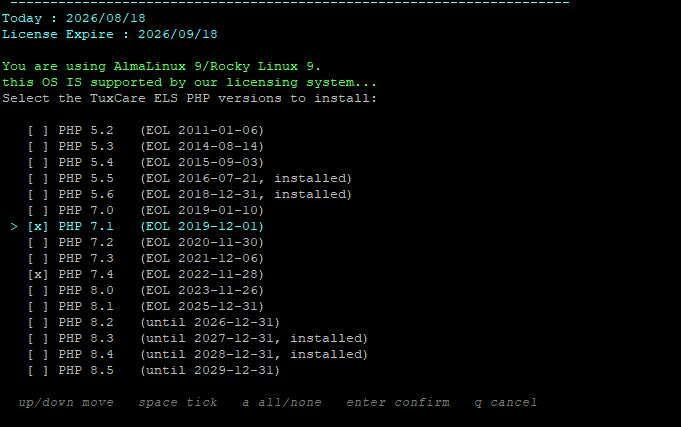
You will get the following result:
-
Use
UPandDOWNarrows to move between PHP versions. -
Use
Spaceto select or deselect. -
Type
Ato select/deselect all versions. -
Press
Enterto confirm. -
Press
Qto cancel.
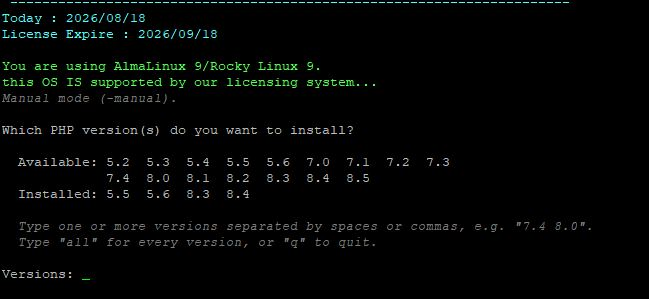
Note: If your terminal does not support the interactive list, a simple selector will load like this:
All Available Commands:
To get the list of available PHP versions:
PWILicenseCP -php -list
To select every version (alt-php group):
PWILicenseCP -php -all
To install selected PHP versions directly:
PWILicenseCP -php -versions=7.4,8.0
Don't ask for installation confirmation:
PWILicenseCP -php -yes
Print the commands instead of running them:
PWILicenseCP -php -dry-run
Force the package manager: dnf or yum
PWILicenseCP -php -pm dnf/yum
Load PHP ELS installation in manual mode:
PWILicenseCP -php -manual
Print help:
PWILicenseCP -php -help
